


Linux desktop application · open source
Native WireGuard.One clear dashboard.
Manage native configurations, interface state and diagnostics. Privileged operations require explicit authorisation.
Independent project; not affiliated with or endorsed by the WireGuard project.
Daily workflows
VPN profiles without a shadow registry
The app integrates with WireGuard configuration already present on the host.
Native discovery
Finds /etc/wireguard/*.conf without maintaining a separate profile database.
Meaningful diagnostics
Shows interfaces, RX/TX counters and observed handshakes; missing values stay unavailable.
Guarded management
Editing, importing, exporting and backing up profiles include explicit safeguards.
Real interface
Inside WG Deck
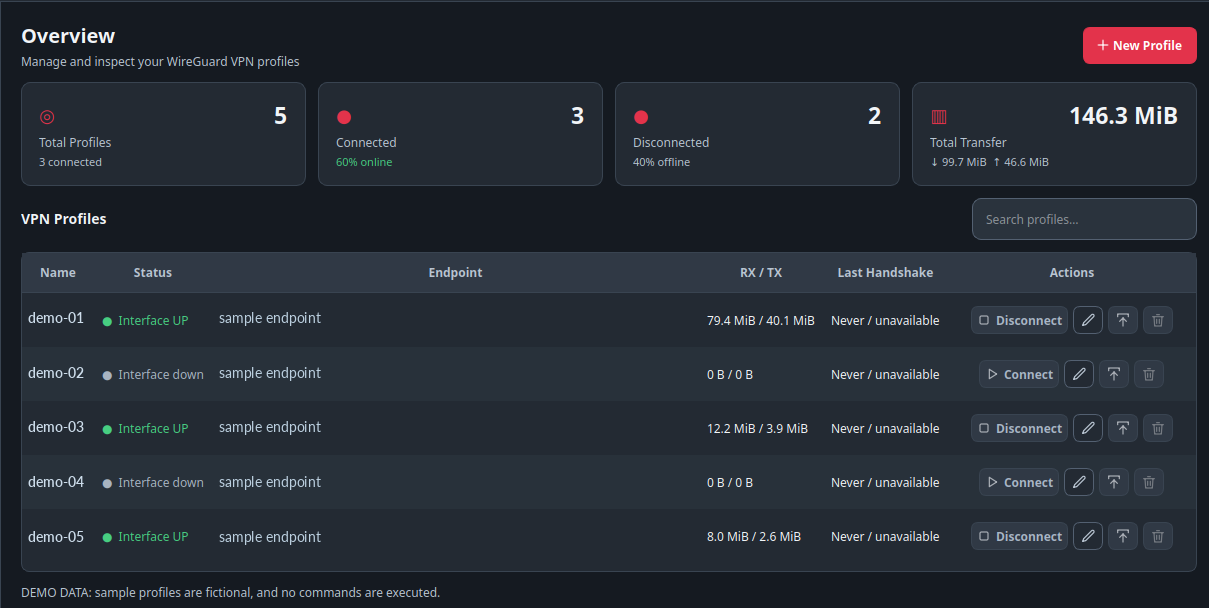
Sanitized screenshots from demo mode: profile names, endpoints and values are fictional; no live VPN session is shown.
Overview of profiles and simulated status.
Architecture
Interface and privileges kept separate
The GUI is isolated from helpers that perform sensitive operations.
Python / PySide6
Dashboard, profile editor, Light/Dark/System themes and system tray.
Polkit and narrow helpers
Connection, disconnection and writes require explicit authorisation.
Safe demo preview
Entirely synthetic data enables UI preview without changing real VPNs.
Security
Respecting the operating system
VPN data and configurations require careful handling.
No automatic connection
Installation enables the read-only inventory publisher, not a VPN connection or disconnection.
Sensitive backups
Profile ZIP archives include private keys and must be stored securely.
Initial target
The v1.0.0 Debian package targets Ubuntu 26.04; universal compatibility is not claimed.
Product status
WG Deck v1.0.0 — public release
Debian package and checksums are published. Demo screenshots do not represent active VPN tunnels.
- Development
- Stable
- Availability
- Debian package available
- Price
- Free
- Source and licence
- GPL-3.0-or-later
- Platforms
- Ubuntu 26.04 / Linux
- Public version
- v1.0.0
Published software
Release, documentation and source
Source, installation guide and official release are public. Need a similar desktop management utility?